
How your printer spies on you
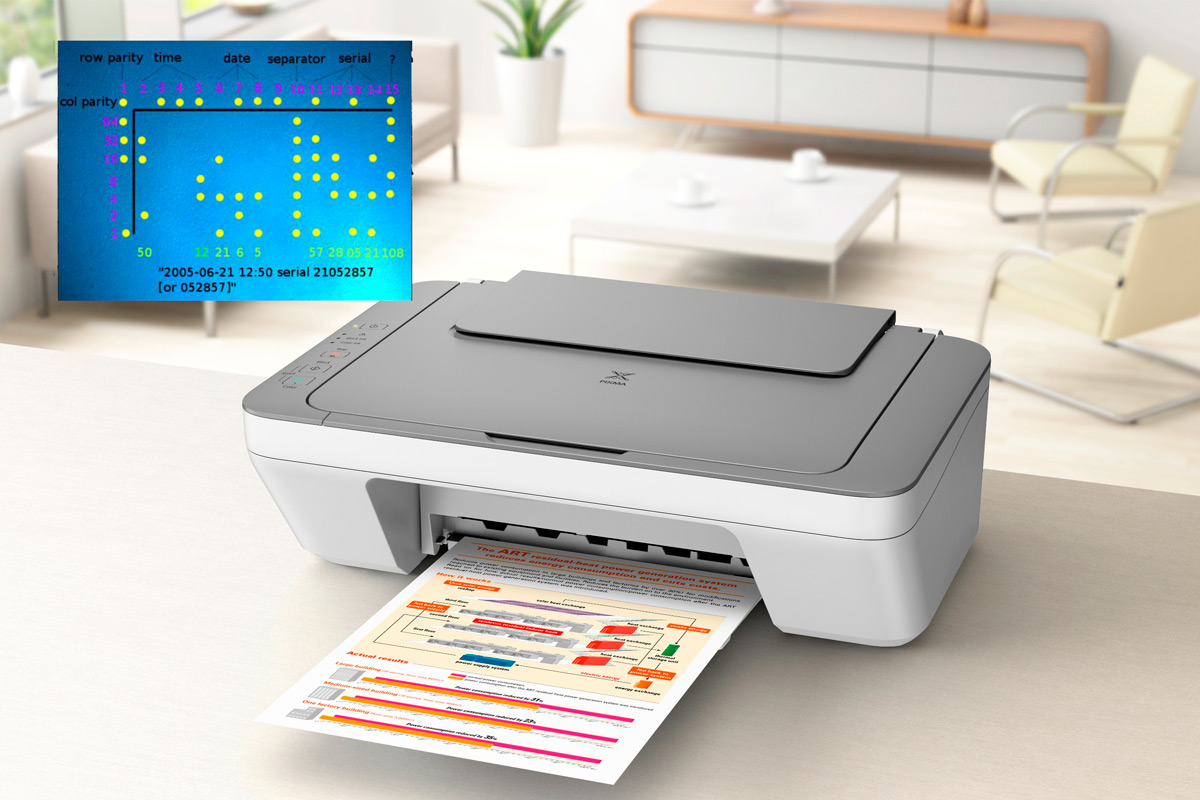
We are used to thinking of digital surveillance as something that lives in a phone, browser, search bar, social network or laptop camera. But sometimes the trace is left not by a screen, but by paper. An ordinary colour printer can print not only text, a photograph or a document, but also a tiny code almost invisible to the eye - a pattern of yellow dots that may reveal when and on which device the page was printed. It sounds like the plot of a techno-thriller, but the technology has existed for decades.
The broader public was reminded of it after the high-profile case of Reality Leigh Winner. On June 3, 2017, FBI agents arrived at the home of the 25-year-old employee of Pluribus International in Augusta, Georgia. She had been working as a contractor for the U.S. National Security Agency and was accused of printing a classified document, removing it from her workplace and sending it to The Intercept.
According to official case materials, Winner admitted to printing the document. Later, security experts examined the published images of the pages and noticed something almost invisible: yellow dots repeating across the sheet in a regular pattern. They are easy to miss with the naked eye, especially on white paper. But when the image is enlarged, contrast is adjusted or colour channels are examined, the dots become clear.
Decoding them indicated a print date and time - May 9, 2017, at about 6:20, based on the printer’s own clock - as well as the device’s serial number. The FBI did not officially confirm that these dots were the main tool used to identify the suspect. Media reports suggested that investigators also relied on printer logs, the limited group of people who had access to the document and other evidence. But the story made one thing obvious: something security specialists and privacy advocates had been saying for years was true - a printed document can also carry metadata.
The yellow dots almost no one sees
Many colour laser printers and copiers add what are known as printer tracking dots, machine identification codes or DocuColor tracking dots to printed pages. Usually, these are tiny yellow dots arranged in a repeating pattern. They may contain the printer’s serial number, the date and time of printing, and sometimes other service information, depending on the model and manufacturer.
This technology is not new. It is commonly associated with anti-counterfeiting efforts, and the public became more aware of it in the mid-2000s, when the Electronic Frontier Foundation studied these markings and published materials explaining how they work. The EFF also maintained a list of printer models on which yellow tracking dots had been found or not found, and provided tools to decode them in certain cases.
It is important to understand that the absence of visible yellow dots does not necessarily mean complete anonymity. Some devices may use other forms of watermarking or service markings. And in corporate or government environments, printing is often tracked in other ways as well: through printer logs, user accounts, access records, network logs and document-control systems.
That is why the Reality Winner case was so revealing. It reminded the public that paper is not always as anonymous as it appears. A document may look like an ordinary printout, while carrying the technical signature of the device that produced it.
This is not only about espionage
At first glance, microdots look like a surveillance tool. And there is some truth in that. If a person does not know that a printer is leaving a hidden code, serious questions arise about privacy and consent. Privacy advocates have long argued with manufacturers and government agencies about how ethical it is to embed invisible identifiers in documents without clearly informing the user.
But the technology also has another side. Hidden markings can help investigate counterfeiting, financial fraud, document leaks, fake banknotes or forged official papers. If a document is presented as old, while its microdots show it was printed recently, that is an important signal for forensic analysis. If a forged certificate, contract or financial document appears, the technical traces of printing may help determine where it came from.
The problem is not that the idea of marking is always bad. The problem is opacity. Users rarely receive a clear warning: this printer may add a hidden identification code to every page. And when a technology is invisible, it inevitably creates mistrust.
Hidden messages are nothing new
The idea of hiding information in plain sight is far older than modern printers. It is called steganography - the art of concealing a message so that the very fact of its existence is not obvious. Unlike encryption, where it is clear that a text is locked, steganography tries to make the message disappear inside something ordinary: a letter, photograph, drawing, file or even the empty spaces between words.
Historical examples can feel almost cinematic. During the Second World War, spies used microdots - tiny images or texts reduced to the size of a speck and hidden on letters, envelopes or other carriers. Outwardly, it looked like ordinary correspondence, but inside it could contain a secret message.
A similar logic is used in protecting money from counterfeiting. Many banknotes contain hidden elements, special patterns, microtext and security markings. Some scanners and photocopiers can recognize certain protective patterns on banknotes and restrict attempts to copy them.
In the digital world, steganography has become even more varied. A message can be hidden in an image, an audio file, a document structure or even in spaces. Some methods use invisible characters, spaces, tabs and line breaks as carriers of hidden information. To an ordinary reader, the text looks empty or neutral, but to someone who knows the scheme, it can contain a message.
What this means for ordinary people
Most people do not need to turn their home office into an intelligence operation. But understanding the principle is useful. A printed document, especially one produced on a colour laser printer or inside an office network, may not be completely anonymous. If you are dealing with legal papers, confidential materials, corporate documents, draft contracts or sensitive information, it is worth remembering that printing also leaves a trace.
This does not mean you should be afraid of every printer. But it does mean you should be more thoughtful about where and what you print. An office printer may keep job logs. A university or library printer may be tied to an account. A corporate network may store information about the user, the time of printing and the file name. And a colour laser printer may add its own technical markings to the page.
For ordinary life, this rarely matters. For journalists, lawyers, company employees, people working with confidential information and anyone passing documents to third parties, it becomes a matter of professional caution.
Privacy rarely disappears loudly
The story of printer tracking dots matters not only because it is connected to a famous case and classified documents. It matters as a symbol. We often imagine the loss of privacy as a dramatic hack, a major data breach or a microphone listening in. More often, privacy disappears quietly: through default settings, hidden identifiers, activity logs, metadata, service codes and small technical details the user never notices.
In this sense, the printer is a perfect metaphor for the modern digital age. It seems like an old-fashioned, almost harmless device from the world of paper. But behind its simplicity lies an entire infrastructure of control, security, anti-counterfeiting and potential surveillance.
The question is not whether every person should stop printing documents. The question is different: should the technologies we use every day leave invisible traces without our clear understanding? And if the answer is yes, then who has the right to read those traces, in what situations and under what oversight?
In a world where almost every digital action already leaves a record, the story of yellow dots on paper feels especially sobering. Even when we step away from the internet and press Print, we do not always leave the world of metadata.